Stop hand parsing solver output
Every simulation group has the folder. It holds a dozen scripts with names like extract_peaks_v3_FINAL.py, each one written late in some project to pull a handful of numbers out of solver output before a design review. They all do roughly the same thing: find the run directories, decode a results file, walk to a few channels, reduce each one to a scalar, print the answers.
Nobody plans to build a post processing system out of copies of that script. It happens one deadline at a time. This article is about getting out: what the script pile actually costs, how to script the job properly if scripting is the right call for you, and what changes when result extraction stops being code at all.
What hand parsing really costs
The obvious cost is the hour it takes to write each script. That is the cheapest part. The real bill arrives later, in four installments:
- The maintenance tax. Binary result formats shift between solver versions. A script that ran fine for a year dies quietly on the next upgrade, usually the week someone needs it.
- The bus factor. The one engineer who understands the byte offsets changes jobs, and the folder becomes archaeology. Every simulation team of more than three people has lived some version of this.
- Copy paste drift. Each project clones the last project's script and edits it. Within a year there are nine variants, no two of which reduce a channel the same way, and nobody is sure which peak definition made it into last month's report.
- The locked door. This is the expensive one. While extraction is a manual step, your results cannot feed anything automatically. Design of experiments, optimization, and sensitivity studies all need the loop to close by itself: change inputs, run the solver, read the results, decide the next point. A human running a script between steps caps the whole workflow at a handful of iterations a day.
If you script it, script it once
Scripting is sometimes the right answer, and when it is, the difference between a liability and an asset is structure. The rules that hold up in practice:
- One shared library, not per project scripts. A single
extract.pythat the whole group installs beats forty copies. Give it an owner and a version number. - Pin your readers. Whatever package decodes your solver's binary output, pin its version next to the solver version it was validated against, and treat upgrades of either as an event.
- Validate before you batch. Check that every requested channel exists in the first result file before processing five hundred of them. A typo that fails at file 1 is a nuisance; at file 480 it is an evening.
- Emit tables, not prints. Write one tidy row per run into a CSV or parquet file. Console output is where results go to die.
The skeleton, independent of any particular solver ecosystem:
from pathlib import Path
import pandas as pd
from readers import read_channel   # your pinned, shared reader

CHANNELS = {
    "peak_disp":   ("nodout/42/z_displacement", "peak"),
    "peak_stress": ("elout/1105/von_mises",     "peak"),
}

rows = []
for run_dir in sorted(Path("runs").glob("eval_*")):
    row = {"run": run_dir.name}
    for name, (path, reduce) in CHANNELS.items():
        series = read_channel(run_dir, path)
        row[name] = series.max() if reduce == "peak" else series
    rows.append(row)

pd.DataFrame(rows).to_parquet("results.parquet")
Done this way, scripting works. It is also a real software project now: it needs review, versioning, tests against known results, and an owner. Budget for that honestly, because the folder of copies is what happens when you do not.
The declarative alternative
The other route is to stop describing how to read results and just declare what you want. In a workflow tool, a result reader is a node you configure instead of code you write: point it at the result files with a glob pattern, browse the channel hierarchy it discovers, pick the channels you care about, and choose a reduction for each, a peak for a constraint check or the full time series for a curve match.
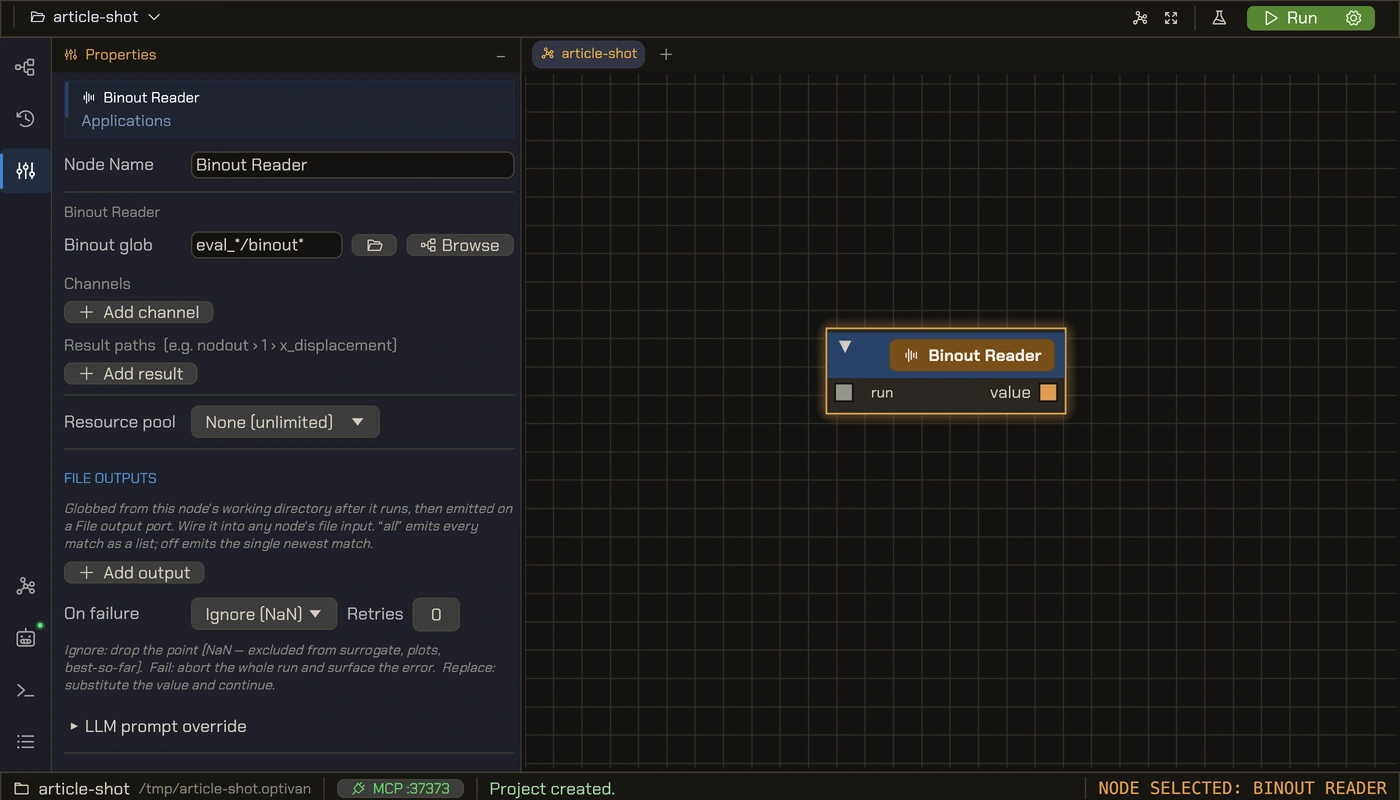
Three things change that no script pile can match:
- Extraction runs inside the loop. The reader executes automatically after every solver run, per evaluation, in the right working directory. A design of experiments with 200 points does 200 extractions with nobody watching.
- The definition lives with the study. Which channel, which reduction, which failure policy: it is all visible in the reader's configuration, saved in the study file, identical for every run. The nine variant problem cannot exist.
- Failure is a policy, not a crash. A run that produces no readable result becomes a dropped point, a retry, or a substituted value, chosen from a dropdown. Your 3am batch does not stop at file 480.
Which route, when
| Situation | Better route |
|---|---|
| Forensic deep dive into one strange run | Script it. Interactive exploration wants a notebook. |
| Exotic or in house result format no tool reads | Script it, once, as a shared library. |
| Results feeding reports on a repeating schedule | Either works; the tool avoids the maintenance tax. |
| Results feeding DOE, optimization, or sensitivity studies | Declarative reader. The loop must close by itself. |
The payoff is the loop
Automating post processing is not really about saving the hour of parsing. It is about what becomes possible once results flow without hands. The moment a peak displacement is a wire instead of a copied number, it can feed an objective. The study that took a week of manual iterations becomes an overnight run with 150 solver calls placed by an optimizer, and the engineer's job moves up a level: from moving numbers between files to deciding what the numbers should be.
That is the loop worth building, whichever route you take to it.
// TRY IT ON YOUR OWN MODELS
Optivan is design optimization on your hardware
Visual node graph studies, DOE and surrogate optimization, native solver results readers, and cluster execution. Free beta, or Pro from $99 a month.
See plans product tour →